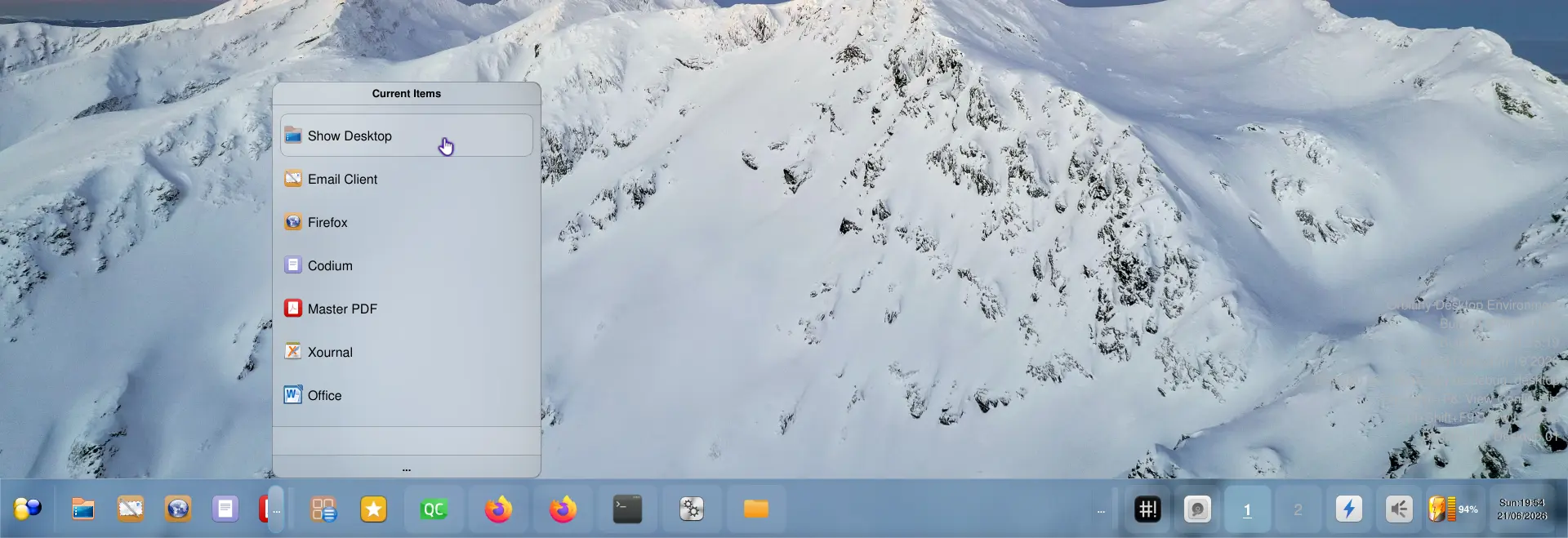
I’ve completely redone the Quick Launch applet’s menu. This is the menu that appears when the three “…” are clicked which is the button at the edge of the applet. It is now a replica of the Drawer Menu as shown in the screenshot. This gives you a proper drag&drop ability to rearrange the items assigned to the Quick Launch applet in the panel without the popup menu getting hidden.
Of course, full drag&drop in the Quick Launch applet (or toolbar if you will) itself is still there. I didn’t touch that part so you can still rearrange items by dragging them horizontally (or vertically if the panel is positioned vertically) and you can still adjust the size of the Quick Launch applet to hide/show items by moving its drag handle (right next to the “…” button shown in the screenshot).
Also, rather than showing hidden items only, the menu is now showing all items. Of course, the filter search field is right down the bottom.
The acrylic panel now looks more blue and that’s because I’ve introduced more color variants. The ones previously shown in my screenshots are color neutral (and the theme is still there).
While doing all this, I encountered a bug with the drawer menu applet. When rearranging items via Drag&Drop, the commands assigned intermittently get mixed up. Anyway, it is fixed now, in the drawer menu itself and the Quick Launch applet.