
Orbitiny Desktop Pilot 9 comes with a new program called “orbitiny-file-copier“. This application lets you copy files and directories and can be integrated with scripts.
Here are a few examples of how to use it.
First, if you try to launch it on its own without specifying any parameters, this is the message you are going to get (this is normal).
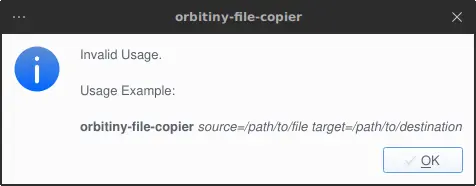
So, the command is: orbitiny-file-copier source=/path/to/file target=/path/to/destination.
If Orbitiny is installed in /opt/orbitiny then you should invoke the utility like this: /opt/orbitiny/orbitiny-file-copier source.
Here is an example of copying a file called some-iso-file.iso from /home/$USER/Desktop/dir1/some-iso-file.iso to /home/$USER/Desktop/dir2.
$ /opt/orbitiny/orbitiny-file-copier source=/home/$USER/Desktop/dir1/some-iso-file.iso target=/home/$USER/Desktop/dir2
Here is what happens when the utility runs:
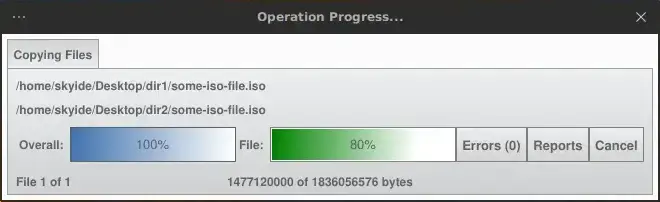
Here is an example of passing multiple destinations (multi-paste):
$ /opt/orbitiny/orbitiny-file-copier source=/home/$USER/Desktop/dir1/some-iso-file.iso target=/home/$USER/Desktop/dir2 target=/home/$USER/Desktop
You can also pass multiple sources and multiple destinations:
$ /opt/orbitiny/orbitiny-file-copier source=/home/$USER/Desktop/dir1/some-iso-file.iso source=/home/$USER/Desktop/dir1/some-iso-file_b.iso target=/home/$USER/Desktop/dir2 target=/home/$USER/Desktop
The variable $INSTALL_DIR is an internal variable used by Orbitiny which translates the string $INSTALL_DIR (as I have demonstrated here in the third screenshot) into the path Orbitiny is installed in.
But, in your case, what you can do is create an environment variable called $ORBITINY_INSTALL_DIR and point it toward Orbitiny’s installation directory and than instead of typing:/opt/orbitiny/orbitiny-file-copier, you can type $ORBITINY_INSTALL_DIR instead.
Example:
$ ORBITINY_INSTALL_DIR/orbitiny-file-copier source=/home/$USER/Desktop/dir1/some-iso-file.iso source=/home/$USER/Desktop/dir1/some-iso-file_b.iso target=/home/$USER/Desktop/dir2 target=/home/$USER/Desktop
Of course, you can name that variable anything you like, you can call it $ORBITINY_INSTALL or $ORB_INSTALL etc.
I hope you find this article useful.
Should it not work as decried here, please let me know.